Jetstream · Stream Deck plugin for Claude Code · free & open source

Your Stream Deck shows which Claude Code project needs you.

One key per project. See what needs you without switching windows, and answer permission prompts with a keypress.

$npm i -g @pimmesz/jetstream

working !needs you done ·idle

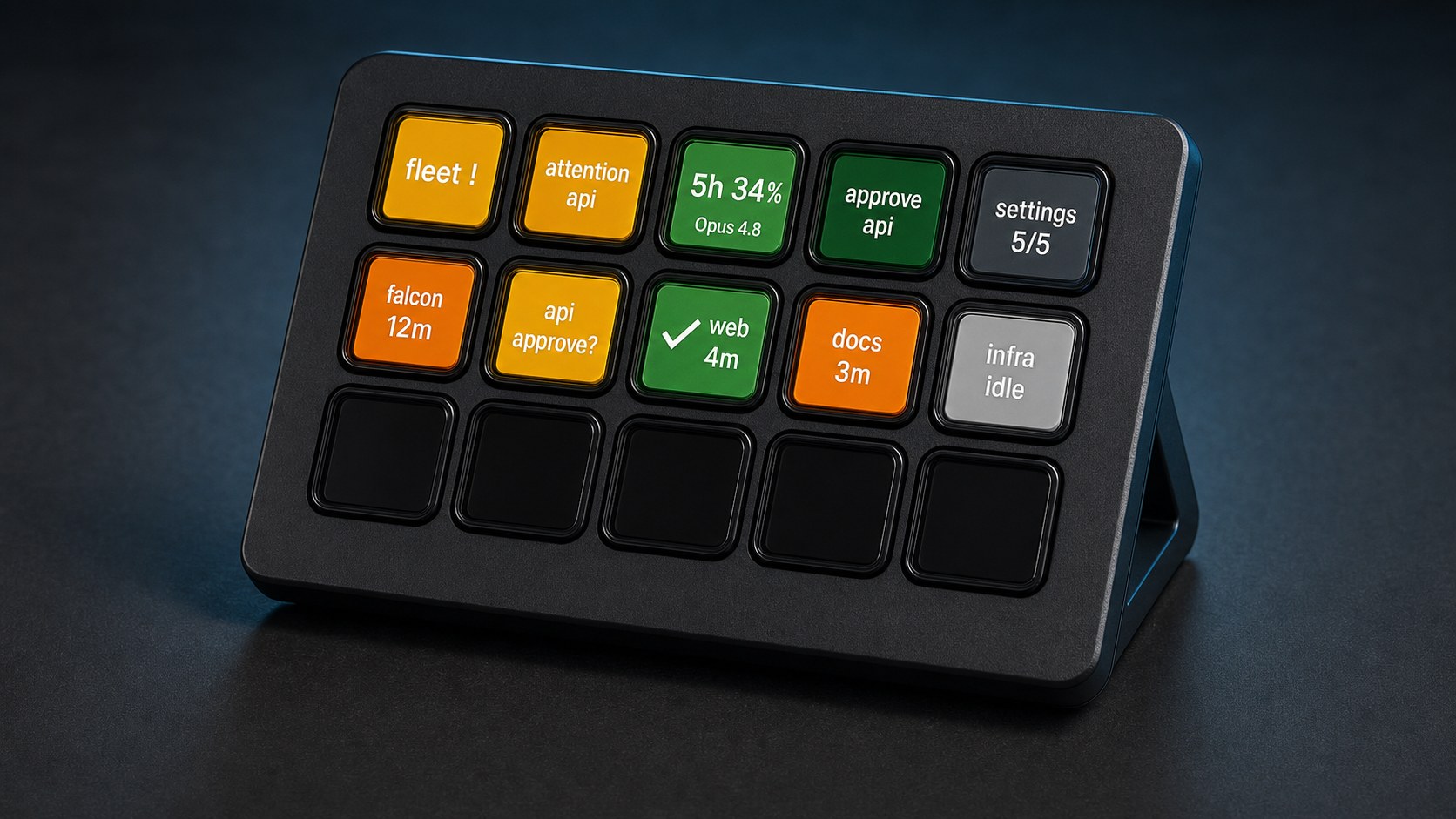
A Stream Deck MK.2 running Jetstream: 15 keys showing a live Claude Code status board — fleet and attention amber, an Opus usage gauge and web done in green, falcon and docs working in orange, approve and settings keys, infra idle in gray, bottom row unlit

The problem

Is anything waiting on you?

Run Claude Code in five repos and it's easy to miss what's waiting. Jetstream shows every project at once, and anything waiting on you glows amber.

Project status

Short press opens it in your editor. Long press interrupts the run. Done keys show the diff size (+120/-40).

Fleet roll-up

One key counts the whole fleet (3w 1! 2✓), coloured by its worst state. For when projects outnumber keys.

Approve / Deny

Answer the oldest pending permission prompt from the deck. No press in ~90s and Claude falls back to its own dialog.

Usage gauge

Your 5h and 7d subscription windows, and the next reset (resets 3h33m).

Attention

A doorbell that flashes when any repo's request goes unanswered.

Stop all

Interrupts every session at once, showing how many are running. Off until you opt in.

Close-up of a lit Stream Deck: falcon and docs orange, api amber and asking to approve, web green and done, infra grey and idle
falcon working, api waiting on you, web done, infra idle.

Setup

Quickstart

You need any Elgato Stream Deck, Node.js 22.12+, and Claude Code on your subscription (claude/login). Leave ANTHROPIC_API_KEY unset; Jetstream strips it from anything it spawns, so a keypress can't bill the metered API.

npm i -g @pimmesz/jetstream
jetstream install            # hands the plugin to the Stream Deck app; approve there

jetstream chat               # describe repos and keys in plain English
jetstream init               # or the guided wizard
jetstream doctor             # read-only health check if keys don't light up

On first launch it adds two hooks to ~/.claude/settings.json (backing it up first): one lights the board, one lets Approve/Deny answer prompts. Restart any running claude sessions to pick them up. Remove the hooks and they stay removed.

jetstream chat

Build the board by talking to it

Laying out a Stream Deck usually means dragging keys and exporting profiles. jetstream chat takes plain English instead. It reads your current board and applies changes live. No export, no re-import.

# examples you can type into jetstream chat
add falcon and api from ~/dev
rename web to frontend and make it blue
put the usage gauge next to approve

What you can say

Build the fleet

"Three repos in ~/dev: falcon, api, web." Jetstream turns that into a validated projects.json.

Place any key

Status, usage, fleet, attention, approve/deny, nav, stop-all, or app, URL and command shortcuts. Addressed by coordinate, so a8 is row 1, column 8.

Restyle it

"Make docs purple." "Call it prod." "Give telegram its real logo." Colours by name or hex; icons from an emoji or an image file.

Rearrange it

It knows your current board, so you can say "move stop-all to the bottom right" or "swap those two" without describing the whole layout.

The model only returns a proposal. Jetstream validates it with the same rules as the init wizard, then writes projects.json itself, so the model never touches your disk or runs a command. If a request is ambiguous, it asks instead of guessing. Runs on your subscription, not the metered API.

For a guided setup, jetstream init scans a folder for repos, writes your config, wires the hooks, and can prebuild a layout.

Each key's sub-line names its state in words, so the board reads without relying on colour; a corner glyph is reserved for exceptions like a stall or a failure. A high-contrast theme swaps red/green for orange/blue.